Use cases
Use cases by role
Illustrative scenarios — how AirPlate AI works for your role
Illustrative scenario · City hotel
Director of sales
The day runs on the inbox: meetings, conferences and dinners, each request waiting for a room, a price and a contract. Writing each offer by hand takes time away from selling, and a planner who waits for an answer may book another venue.
The pain
- Slow replies while planners compare venues.
- Proposals written by hand, one request at a time.
- Pressure to win more of the requests that come in.
- Tools that do not work together, so requests and contracts live in separate places.
Features used
The flow, step by step
- 01
Request intake
Planners fill in your branded request form, in English or French: event type, date, guests, packages and add-ons.
Event RFP intake form - 02
Offer
A request that meets your rules is priced from your packages and pricing rules and e-mailed to the planner. One that needs your review waits in Review & Send with the reason.
Proposals and offers - 03
Contract and e-signature
Send the contract from the booking, or let it go out automatically for the event types you choose. Your client and your venue sign online with Documenso.
Contracts and e-signature - 04
Deposit
When both parties have signed, the client is sent the deposit link and pays by card to your hotel's own Stripe account.
Deposits and payments - 05
Apaleo hold (in certification)
If your hotel runs on Apaleo (in certification: switched on per venue, on request), each request is held in Apaleo and the hold follows the booking status.
Integrations - 06
BEO
The banquet event order is built from the booking and published as a PDF revision for the events team.
Banquet event orders (BEO) - 07
Telegram assistant
Between meetings, /rfps lists the newest five requests awaiting your answer, and each new request arrives as a short alert with buttons that open the booking.
Telegram assistant
Illustrative scenario · Castle or estate venue
Events coordinator
Weddings, galas and seminars at the estate, each with its own room layout, timing and menu. The coordinator keeps the client, the kitchen and the rest of the team working from the same details while those details keep changing.
The pain
- Coordination between the client, the internal teams and outside suppliers.
- Changes that arrive by phone and e-mail and are tracked by hand.
- The risk that a mistake or a misunderstanding reaches the event itself.
Features used
The flow, step by step
- 01
Request intake
Each request arrives with its event type, date, time and guests, the room layout where you offer one, packages and add-ons.
Event RFP intake form - 02
Offer
When the client's plans change before the deposit is paid, Create New Offer makes a new version of the booking and keeps the old one as history.
Proposals and offers - 03
Contract and e-signature
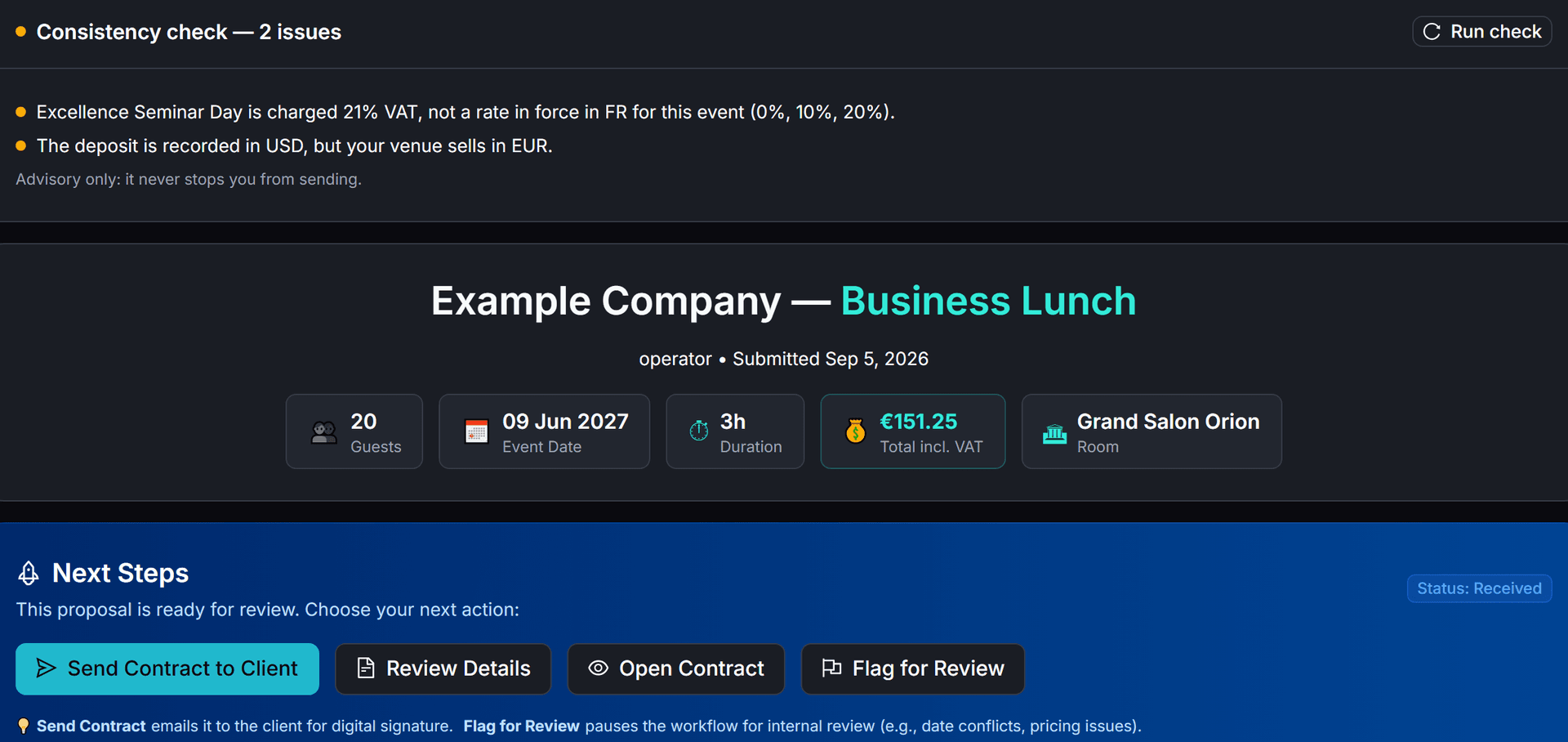
The contract carries your terms and cancellation policy. When you send it, the consistency check lists anything that does not match between the booking, the contract and the BEO.
Consistency checker - 04
Deposit
Once both parties have signed, the deposit link goes out, and the booking moves to Deposit Received by itself when it is paid.
Deposits and payments - 05
Apaleo hold (in certification)
For a venue connected to Apaleo (in certification), changing the booking's date, time, guest count or room updates its holds in Apaleo; a move to another Apaleo room type is refused and the hold stays as it was.
Integrations - 06
BEO
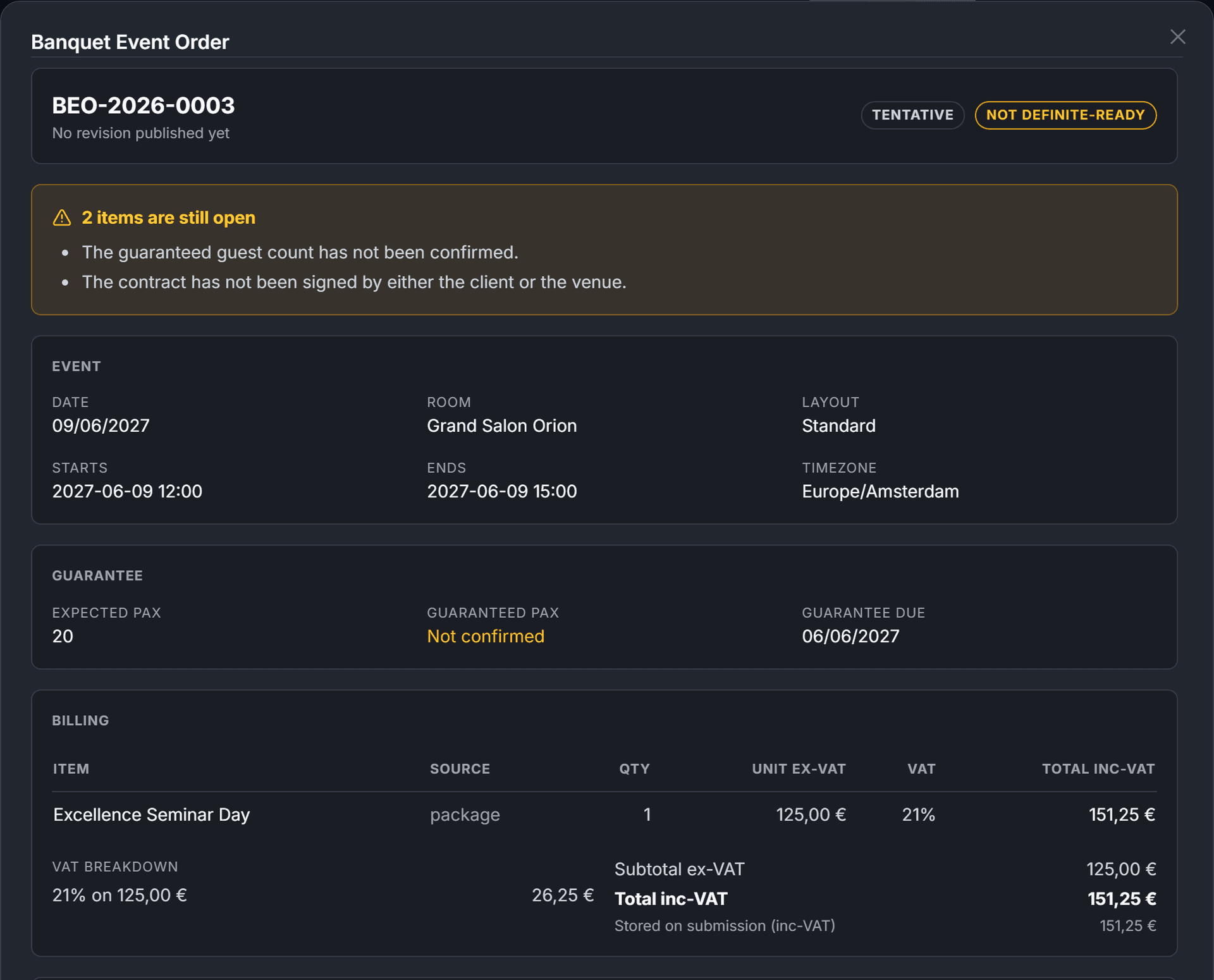
The BEO brings together the event, room, times, expected guest count and billing lines by department, and lists what is still open on the sheet.
Banquet event orders (BEO) - 07
Telegram assistant
A change heard on a site visit can be sent as a voice note: the bot shows what will change and the new total, and nothing changes until you press Confirm.
Telegram assistant
Illustrative scenario · Boutique hotel
General manager
In a small hotel, the general manager often answers event requests alongside everything else. What matters is knowing which events are confirmed, which are waiting and what has been paid, and keeping sales, events and the kitchen in step.
The pain
- Work spread across departments, with no single view of the event commitments.
- Gaps between sales, events and operations.
- Revenue goals weighed against what the team can deliver.
Features used
The flow, step by step
- 01
Request intake
Your form applies your rules: a request inside your minimum notice is refused, and a guest count outside your limits or a date in a closing period waits for your review.
Event RFP intake form - 02
Offer
Requests that meet your rules are priced from your catalogue and e-mailed to the client, and every status change of each booking is recorded on its timeline.
Proposals and offers - 03
Contract and e-signature
Keep contract sending on Manual to approve each contract, or let it go out automatically. The booking is confirmed when you countersign, unless you switch on auto-sign.
Contracts and e-signature - 04
Deposit
Deposits go to your hotel's own Stripe account. AirPlate AI takes no fee and never holds the money.
Deposits and payments - 05
Apaleo hold (in certification)
If your hotel runs on Apaleo (in certification: switched on per venue, on request), the event space and bedrooms of each request are held in Apaleo.
Integrations - 06
BEO
Each booking has one BEO, built from it and published as a PDF revision the whole team can work from.
Banquet event orders (BEO) - 07
Telegram assistant
/today counts today's confirmed events, new requests and requests awaiting your answer, and /kpi shows this month in figures.
Telegram assistant
Illustrative scenario · Hotel group
Central sales
A central sales team answers event requests for the hotels of a group, each hotel with its own event spaces, prices and terms. The pains are those of a director of sales, repeated for every hotel.
The pain
- Slow replies while planners compare venues, for every hotel in the group.
- Offers written by hand, hotel by hotel, each with its own prices and terms.
- Tools that do not work together across the hotels.
Features used
The flow, step by step
- 01
Request intake
Each hotel has its own branded request form. A planner's request goes to the hotel whose form it was sent from.
Event RFP intake form - 02
Offer
The request is priced from that hotel's own catalogue and checked against its event spaces.
Proposals and offers - 03
Contract and e-signature
Each hotel's contracts carry its own terms and are signed online with Documenso.
Contracts and e-signature - 04
Deposit
Deposits are paid to each hotel's own Stripe account.
Deposits and payments - 05
Apaleo hold (in certification)
Apaleo accounts can hold several properties; each AirPlate AI hotel account connects one of them (Apaleo integration: in certification).
Hotel groups - 06
BEO
Each booking's BEO is built in its own hotel's account.
Banquet event orders (BEO) - 07
Telegram assistant
Each colleague connects their own Telegram chat, for the hotel account they belong to.
Telegram assistant
Within each hotel, invite sales colleagues with a role, admin or limited user, and assign tasks on events. A team member belongs to one hotel's team.
For the whole group, on request
- On request
One login for several hotels
Today each hotel's account has its own login.
- On request
Central sales across your hotels
Today a team member works within one hotel's account.
- On request
One request sent to several hotels
Today a planner's request goes to the hotel whose form it was sent from.
How much time do event requests take your team?
Work it out from your own numbers: the requests you receive, the time each reply takes and your own estimate with AirPlate AI.
Open the time-saved calculator