Article
What we learned building automatic event RFP pricing for hotels
Notes from building AirPlate AI: the rules that price an event request, place it in a room, write its contract and hold its space, and the tests that changed them.
By Anthony Soyer, Founder · Published
Last updated
Founder
Where it started
When I started AirPlate AI, I looked at how hotels and conference centres actually handle event requests. Most of the work is not the reply itself: it is gathering the details, then chasing the planner by e-mail and phone until the need is clear. Many events are lost along the way, often simply because the reply comes late, and in the end the planner decides who they work with. City hotels depend heavily on small groups and one-off workshops, where neither side wants to spend time on each other until the event is signed. An AI model would have been cheap enough to quote every request, but a price sent to a planner is a commitment, so in AirPlate AI the price always comes from the venue's own catalogue and rules. And the venue keeps the final say: it decides which events it agrees to host, because the signature is always its own.
Pricing
A price is a rule, never a model's answer
AirPlate AI prices each request from the venue's own catalogue: its packages, its optional services and its pricing rules, such as a percentage up or down for the dates and event types the venue chooses. The same request gets the same price every time, and the venue can check each line against its own catalogue.
The AI assistant does take part in a booking. When someone asks it, by text or by voice note, to change the guest count or add a service, the model only fills in the fields of that change. Before anyone confirms, the summary is rebuilt from the database: the catalogue's names, the stored guest count and prices recalculated by the same code that priced the request. A price in the model's answer never reaches the booking.
The model can ask for a tool, but it cannot run one. Our own code runs every tool the model asks for, and a tool that writes waits for a person.
| Excellence Seminar Day (package), €125.00 × 12 | €1,500.00 |
|---|---|
| Gourmet Coffee Break (optional service), €12.00 × 12 | €144.00 |
| Subtotal excluding VAT | €1,644.00 |
| VAT 10% | €14.40 |
| VAT 20% | €300.00 |
| Estimated total including VAT | €1,958.40 |
| Deposit (30%) | €587.52 |

Consistency
One copy of the money rules
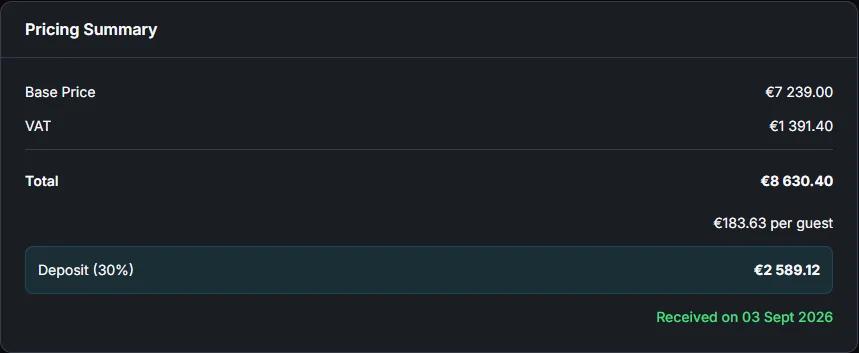
When the venue's catalogue prices a request, the request form shows the planner a summary before the request is sent: the subtotal, the VAT by rate, the total and the deposit. It uses the server's own code to split the VAT, apply the pricing rules and count nights or days, so the form and the server count the total the same way.
We keep one copy on purpose. A second copy of a price rule drifts the first time one of the two changes, and the planner then reads one total while the contract says another.
Event spaces
The smallest room that fits comes first
In our own test on 14 October 2026 we had three meeting rooms, for 6, 12 and 18 people. Three requests for 6 guests came in, and the first one was given the room for 18. A party of 15 asking next would have found only rooms too small for it.
Since then the smallest free room that fits is offered first, and rooms of the same size keep the venue's own ranking. A combination of rooms comes only when no single room fits, because a combination holds two rooms.
A room counts as free only when nothing overlaps once the set-up and clear-down time of both bookings is added. When no room is free, the request waits for the venue's review in Review & Send.
Your rules
Flag a request, refuse only one kind
A request for a group larger than the venue's limit, or for one of its closing days, goes to Review & Send, where the venue decides. Such a request is still a lead, and refusing it would lose it before anyone at the venue saw it.
The one request AirPlate AI refuses is one inside the venue's minimum notice, because there is no time left to prepare the event.

Contracts
One contract clause per cancellation band
A venue sets its cancellation tiers once: cancelling more than a number of days before the event costs a percentage of the booking. Each tier used to print as “More than N days before the event”. In October 2026, on our own test venue, a cancellation 100 days before the event matched all four lines at once (25 %, 40 %, 70 % and 100 %), and the contract said nothing about the last days before the event.
Each tier now prints as its own band: more than N days, between N and M days, and a final clause for the last days, which carries the last tier's fee. Fees never fall as the event comes nearer, and the days are whole numbers, each used once.
Two smaller changes came from reading our own test contracts. The clause is called a cancellation fee, because “Full cancellation” read as if the booking were fully cancellable. And a partial-cancellation fee of zero is left out, instead of being printed on every line.
Deposits
The deposit is a share of the total including VAT
The deposit is a percentage of the booking total including VAT, and the client pays it to the venue's own Stripe account. AirPlate AI takes no commission on it.
The deposit is due on signature: the deposit link goes out when every party has signed, if the venue's Stripe account can take payments. The sentence that tells the client so is written once, in English or French, and the form, the contract, the offer and the client mails all show that same sentence.
Control
A person confirms what the assistant prepares
On Telegram, a change the assistant prepares comes with three buttons: Confirm, Change and Cancel. The pending change waits five minutes and can be confirmed once. Sending a contract, and anything that signs, also needs the venue's PIN; five wrong PINs lock every Telegram change for 15 minutes.
Before a contract goes out, a consistency check compares the booking with the contract and the banquet event order: the dates, the guests, the prices, the VAT and the deposit. The check only advises: it never stops a send, and if it cannot finish within its time box, the contract still goes out.
Automatic contract sending, when a venue switches it on, has no approval step: the venue's control there is its countersignature, unless it has also switched on auto-sign.
Apaleo (in certification)
Holding the space in Apaleo (in certification)
With Apaleo (in certification), a new request places a tentative block on the event space. In our own tests in October 2026, a tentative block took nothing out of sale, so on its own it cannot keep another booking away.
Sending the contract makes the Apaleo block (in certification) optional, which does take the space out of sale until the end of the day after the offer's “valid until” date, at the latest the day the hold starts. Without a “valid until” date, the holds stay optional until the end of your default proposal validity (Settings > Sales Terms; 14 days by default, counted from the day the booking went to Contract Sent; at the latest the day the hold starts), then the space goes back on sale in Apaleo and the booking stays open. A won booking makes the block definite; putting the booking on hold returns it to tentative, and a lost or cancelled booking cancels it.
In Apaleo (in certification), AirPlate AI writes blocks and a group, never reservations. The group's name, AIRPLATE-RFP- followed by the request number, is the only tag a block can carry back to us. When Apaleo refuses a value, an automatic push does not send that value again, and the booking page says what was refused.